


What's landing?
Most marketing teams have felt this friction at some point. A simple journey needs building, a welcome email, a Slack alert to sales, a discount code on sign-up, and getting there means a ticket, a queue, and a wait for development time.
Umbraco Automate launched a full release on 9 July, and as an Umbraco Platinum Partner we've been testing its capabilities for you. At its core, it's a drag-and-drop automation engine built directly into the Umbraco backoffice, and it's designed to remove exactly that kind of friction.
What Umbraco Automate actually enables
Drawing on Automate's built-in capabilities, a few features make the biggest practical difference:
Native, out-of-the-box triggers
Standard triggers and actions work from day one, with native hooks already built for Forms, Commerce and Engage. A form submission can notify a rep. An order status change can kick off a follow-up. A Persona Score shift can start a personalised journey.
Drag-and-drop journey building
Journeys that used to require a development ticket can be assembled visually by the team closest to the campaign. Simple and complex automations, including paths, loops and conditional logic, are all buildable without code.
Open architecture for developers
Automate is open source, with no limits on runs, triggers, actions or users. Webhooks connect it to systems outside Umbraco entirely, and developers can write custom C# triggers and API extensions where the out-of-the-box actions don't go far enough.
AI with a human-in-the-loop
Automate can call an AI agent to draft a summary or generate alt text when content is uploaded, or let an AI agent trigger an automation in the other direction. Approval steps sit between the AI output and anything going live, so a person on the team reviews it before it reaches a visitor.
Data that stays where your CMS runs
Automate runs inside your existing Umbraco environment rather than routing customer data through a third-party platform. For anything processing personal data through sign-ups, forms or commerce, that's a simpler GDPR position than the average SaaS automation tool offers.
All of this depends on which add-ons you're already running and how your wider tech stack is configured. But it provides a strong foundation for teams looking to automate without adding development overhead.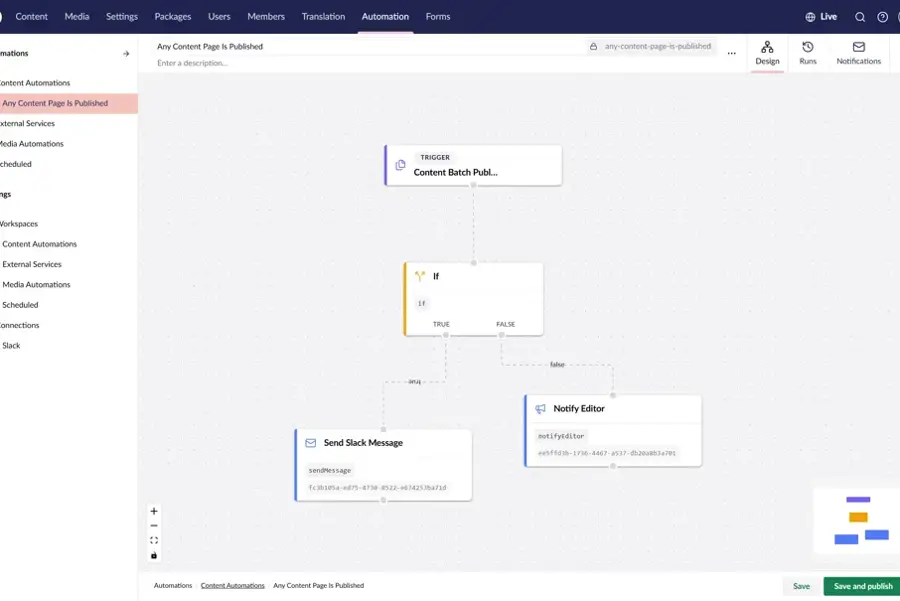
Built for both sides of the team
For marketers, the drag-and-drop canvas means journeys that used to need a development ticket can be built and adjusted directly, without waiting on a sprint.
For developers, the open architecture and API-first design mean custom triggers, webhooks and edge cases stay firmly within their control, without becoming the bottleneck for every routine journey.
That split is worth highlighting, because it's what makes Automate different from handing marketing a tool that quietly creates technical debt for development to clean up later.
What this looks like in practice
With the right setup, Automate can support:
Onboarding journeys triggered the moment a customer signs up
Follow-ups tied to commerce events like order status changes
Personalised content journeys driven by Engage's Persona Scores
AI-assisted content prep, with a reviewer in the loop before publishing
Custom integrations with tools outside the Umbraco ecosystem via webhooks
These are practical applications of Automate's feature set, and the value scales with how much of your existing stack it can already see.
Where we see this fitting fastest
Our early view is that Automate earns its place quickest in setups already using Forms, Commerce or Engage, since the native triggers mean value from day one with very little configuration. For everyone else, it's still a reasonable case for replacing a patchwork of point-to-point automation tools with something native and governed.
Important note: open architecture gives you the option of connecting your entire stack. The value comes from planning which journeys are worth automating first, not automating everything because it's suddenly possible.
Outcome: less time waiting on development tickets for routine journeys, and clearer ownership of who builds what.
Final thoughts
Umbraco Automate brings native automation, AI assistance and cross-stack connectivity directly into the CMS, with marketing and development able to work from the same tool without stepping on each other's responsibilities.
The impact will depend on which add-ons you're already running, how mature your existing journeys are, and how much governance you put around what gets automated first.
Think about the last automation your team wanted but didn't get, because it meant a development ticket and a wait. Would that have shipped in an afternoon if your marketing team could have built it themselves?
If you're exploring what Umbraco Automate could take off your team's plate, we'd be happy to help you work out where to start.
About the Author
Kevin Triggle is Director of Web Solutions at Digital Wonderlab and leads the Umbraco Platinum partnership. An accredited Umbraco Professional, he specialises in web design and development, balancing technical functionality with strong design, and is driven by helping clients get genuine business value from the platforms they invest in.


